Fixed Deposit
Purpose
A Fixed Deposit (also called a term deposit) is a savings account where a member locks a specific amount of money for a fixed period of time. In exchange for keeping the money locked, the member earns a higher interest rate than a regular savings account. The money cannot normally be withdrawn before the maturity date without incurring a penalty.
Who Can Access
| Role | Access Level |
|---|---|
| Administrator | Full access — open, manage, and mature accounts |
| Committee Member | Full access |
| Account Officer | Can open accounts and manage maturity |
| Teller | Can view accounts |
| Auditor | View-only |
| Member | Can view their fixed deposit certificate and details on the portal |
How to Open This Page
Sidebar → Savings → Open Account (then select a Fixed Deposit product)
Opening a Fixed Deposit Account
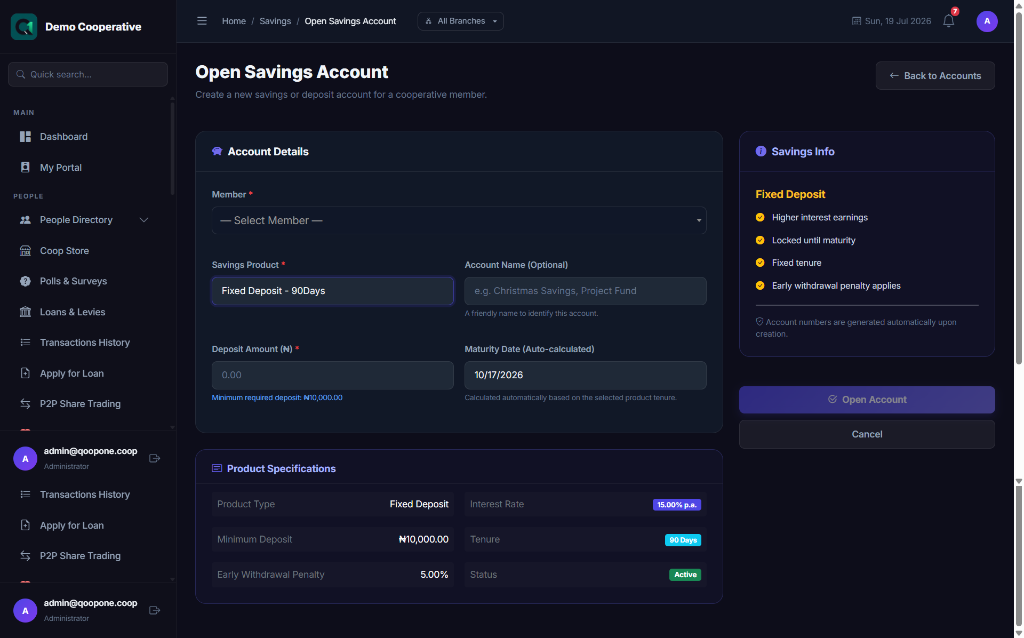
When you select a Fixed Deposit savings product, special fields appear.
Field Guide
| Field | Required | Description | Example |
|---|---|---|---|
| Member | Yes | The member placing the deposit | Ngozi Adichie (MBR-0034) |
| Savings Product | Yes | Select a product of type Fixed Deposit | 12-Month Fixed Deposit |
| Account Name | No | Optional friendly name | 2027 Investment |
| Deposit Amount | Yes | The lump sum the member wishes to deposit. Must meet the product's minimum deposit requirement. | ₦1,000,000 |
| Maturity Date | Auto | Calculated automatically from today's date plus the product tenure (e.g. 365 days = 1 year). Read-only — you cannot change this. | 18/07/2027 |
When a product is selected, the system shows:
- Interest Rate — the annual rate earned on the deposit
- Minimum Deposit — the least amount acceptable for this product
- Tenure — how long the money must stay locked (in days)
- Early Withdrawal Penalty — the fee charged if the member withdraws early
Step-by-Step: Open a Fixed Deposit Account
- Go to Savings in the sidebar.
- Click Open Account.
- Select the Member.
- From the Savings Product dropdown, choose a Fixed Deposit product (look for Fixed Deposit type).
- Review the product details that appear on the right — interest rate, tenure, penalty.
- Enter the Deposit Amount. The minimum deposit hint is shown below the field.
- Note the Maturity Date — it is auto-calculated. You cannot change it.
- Click Open Account.
- The system creates the account and posts the initial deposit.
Fixed Deposit Certificate
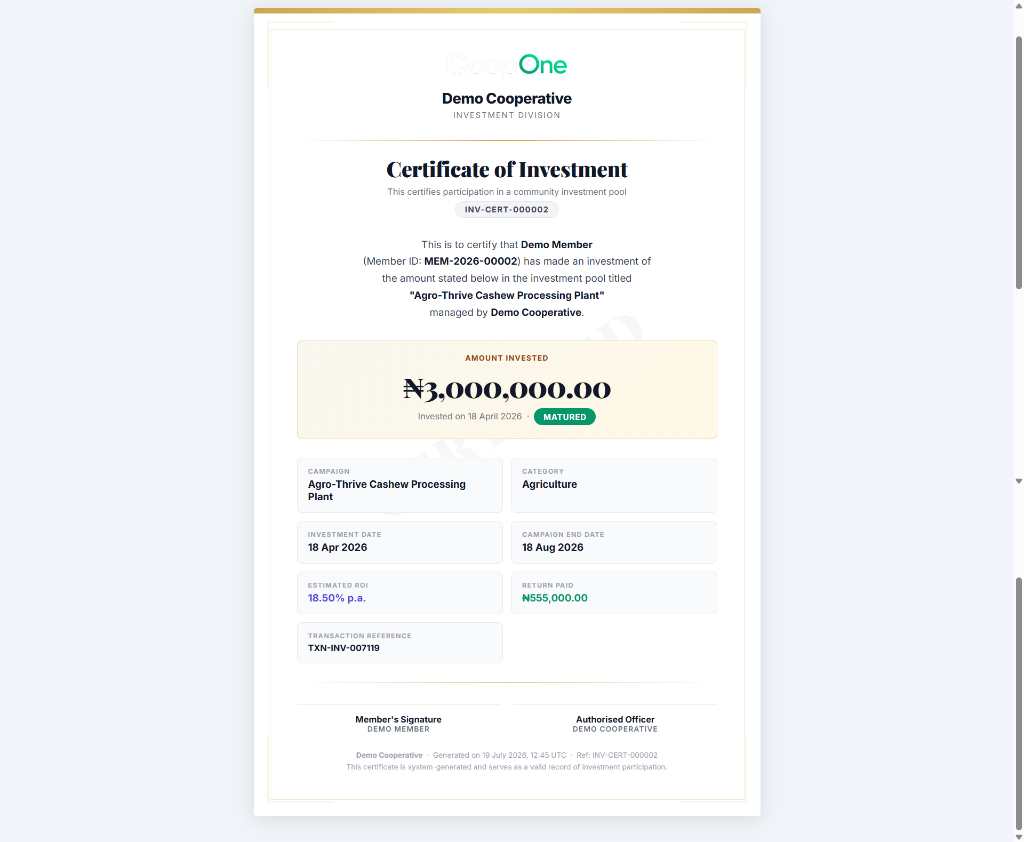
After opening a fixed deposit, you can print an Investment Certificate for the member.
- Open the account details page.
- Click Print Certificate or View Certificate.
- The certificate shows:
- Member name
- Certificate number
- Deposit amount
- Interest rate
- Maturity date
- Total interest to be earned
Account Details Page
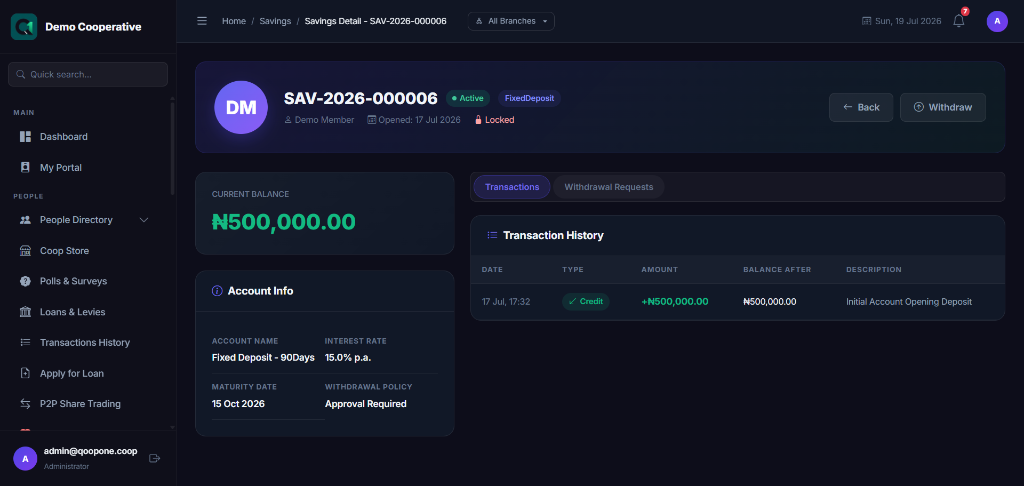
The details page shows:
- Deposit Amount — the original amount deposited
- Interest Rate — annual rate
- Tenure — total number of days
- Maturity Date — when the deposit matures
- Interest Earned — interest accrued so far
- Status — Active, Matured, or Closed
Actions
| Button | What It Does |
|---|---|
| Mature Account | Process the maturity — releases the principal and interest to the member. Used when the deposit reaches its maturity date. |
| Break Deposit (Early Withdrawal) | Allows the member to withdraw before maturity. An early withdrawal penalty will be deducted. |
| Rollover | Renew the fixed deposit for another term |
| Print Certificate | Prints the investment certificate |
Tips
Encourage Longer Terms
Fixed deposits with longer tenures usually earn higher interest rates. Help members understand the benefit of locking in for 12 months vs. 6 months.
Early Withdrawal Penalty
If a member withdraws before the maturity date, a penalty is charged. The system calculates this automatically based on the product settings. Always inform the member before processing an early withdrawal.
Maturing Accounts
Check the Savings list regularly for accounts nearing their maturity date and contact the member to discuss rollover or withdrawal options.
Common Mistakes
| Mistake | How to Avoid |
|---|---|
| Depositing less than the minimum required | The system shows the minimum amount as a hint. The form will show an error if the amount is too low. |
| Manually editing the maturity date | The maturity date is locked. It is calculated automatically — do not try to change it. |
| Processing a maturity too early | Confirm the maturity date before clicking Mature Account |
Frequently Asked Questions
Q: Can a fixed deposit be topped up after opening?
A: Generally no. Fixed deposits are for a fixed amount. If more money needs to be invested, open a new fixed deposit account.
Q: What happens on the maturity date?
A: A staff member (Account Officer or Administrator) must manually process the maturity. The system does not automatically release the funds. Go to the account and click Mature Account.
Q: Can the interest be paid monthly instead of at maturity?
A: This depends on how the savings product is configured by your administrator. Some products may pay interest monthly; others pay at maturity.
Q: Is the member's deposit insured?
A: This depends on your cooperative's policies and applicable law. Ask your administrator.