Levies & Deductions
Purpose
The Levies module allows the cooperative to define and manage mandatory deductions from members' accounts or payroll. Levies might include registration fees, welfare contributions, building funds, or any periodic charge that members are obligated to pay. This module ensures that all levies are tracked, collected, and correctly posted to the cooperative's accounts.
Who Can Access
| Role | Access Level |
|---|---|
| Administrator | Full access — create, edit, and process levies |
| Committee Member | Can approve levy schedules |
| Account Officer | Can view and post levy collections |
| Auditor | View-only |
How to Open This Page
Sidebar → Levies
Levies List
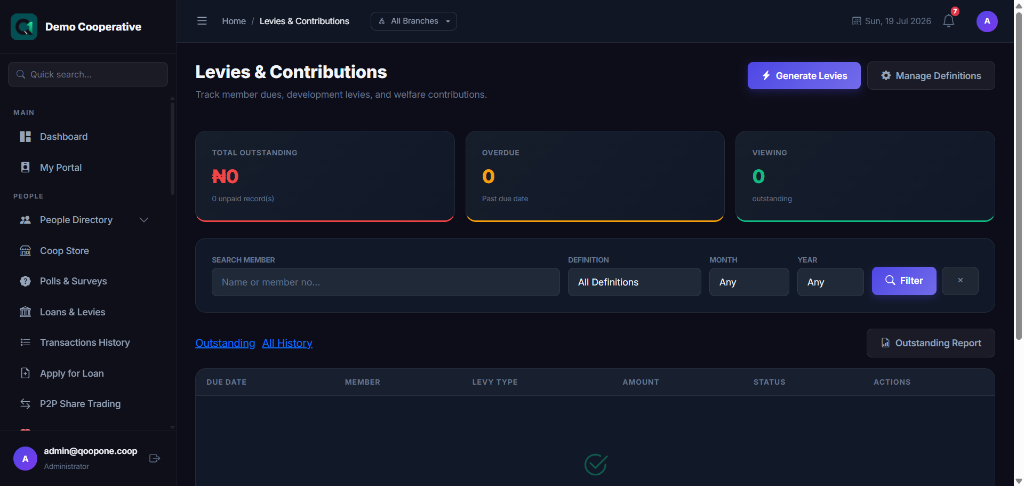
Shows all configured levies.
| Column | Description |
|---|---|
| Levy Name | Name of the levy (e.g. Building Fund, Welfare Fund) |
| Amount / Rate | Fixed amount or percentage per member |
| Frequency | Monthly, Quarterly, Annually, One-time |
| Status | Active or Inactive |
| Actions | 👁 View · ✏️ Edit |
Creating a Levy
- Go to Levies.
- Click Create Levy.
- Fill in the form:
| Field | Required | Description | Example |
|---|---|---|---|
| Levy Name | Yes | A clear name for this levy | Monthly Welfare Fund |
| Description | No | Explain what the levy is for | Monthly contribution to the welfare fund |
| Amount Type | Yes | Fixed (flat amount) or Percentage (of salary or savings) | Fixed |
| Amount / Rate | Yes | The levy amount per member | ₦500 |
| Frequency | Yes | How often this levy is charged | Monthly |
| Applicable Tiers | No | Which membership tiers this levy applies to | All Tiers |
| Active | Yes | Whether this levy is currently running | Yes |
- Click Save.
Collecting Levies
- Go to Levies.
- Click on the levy you want to collect.
- Click Collect Now or Run Deductions.
- Review the list of members who will be charged.
- Confirm to post the deductions.
The system posts a debit entry to each member's savings account and credits the cooperative's levy income account.
Tips
Automate Where Possible
Regular levies (e.g. monthly welfare) can be set to run automatically at the start of each month. Ask your administrator to configure the automated schedule.
Sufficient Balance
If a member does not have enough balance in their savings account, the levy will not deduct. The system logs these as exceptions. Review and follow up manually.
Frequently Asked Questions
Q: Can levies be waived for specific members?
A: Yes. An administrator can exempt specific members from a levy. Contact your administrator.
Q: What account does the levy income go to?
A: Each levy is mapped to an income account in the Chart of Accounts. This is configured when creating the levy.